
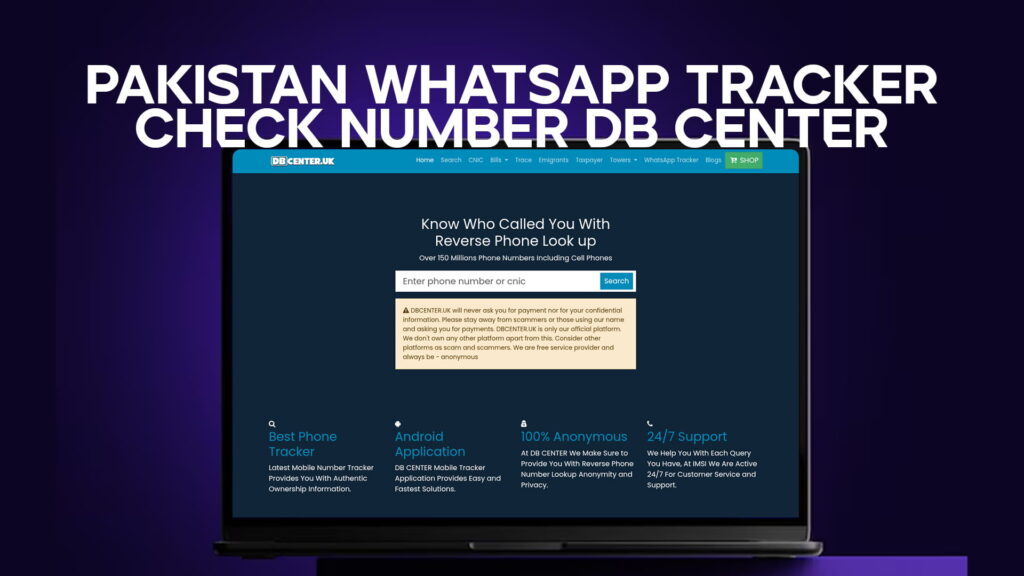
Most people in Pakistan have been there. Your phone rings, the number is unfamiliar, and you genuinely do not know whether to pick up or ignore it. Maybe you missed a call and now you are wondering who it was. Maybe someone keeps messaging you on WhatsApp from a number you do not recognize.
It is a frustrating situation. And it is more common than you think.
DB Center was built exactly for moments like this. It gives you access to a reverse phone lookup service covering more than 150 million phone numbers in Pakistan — mobile and landline. You type in the number, and within seconds you find out who it belongs to.
No guessing. No waiting. No calling the number back just to find out it is a scammer.
What Is DB Center and What Does It Actually Do?
DB Center is an online reverse phone lookup platform. Think of it as a directory that works in the opposite direction — instead of looking up a person to find their number, you start with the number and find the person.
The database behind it covers over 150 million Pakistani phone numbers, which is one of the most extensive collections available for this purpose. That number includes mobile numbers from all major networks as well as a significant portion of landline records.
When you search a number on DB Center, the platform checks its records and returns the available ownership information tied to that number. This might include the registered name, the telecom network, and other relevant details depending on what is in the database.
The platform works for both incoming calls and WhatsApp messages. Since WhatsApp accounts are registered using mobile numbers, you can look up a WhatsApp contact the same way you would any other number. Enter the number, check the results.
It is a simple idea. But for millions of people dealing with unknown contacts every day, it makes a real difference.
Why So Many Pakistanis Are Searching for WhatsApp Number Trackers
Pakistan has one of the highest WhatsApp usage rates in Asia. Families use it to stay in touch. Businesses use it to manage orders and customer queries. Schools use it for announcements. It has become as normal as a regular phone call.
That widespread adoption has a downside. WhatsApp is also the platform of choice for scammers, harassers, and fraudsters. It is easy to create an account using any SIM, and unless the person is in your contacts, their real identity stays hidden behind a phone number.
The number of scam-related complaints filed in Pakistan has grown steadily over recent years. People report receiving messages from strangers posing as bank officials, overseas recruiters, prize-winning schemes, and government representatives. Others deal with more personal situations — harassment from unknown contacts, threatening messages, or repeated calls from blocked numbers that keep coming from slightly different numbers.
In all of these situations, the most basic question is the same: who is this person?
DB Center answers that question. Once you have a name or ownership detail attached to a number, you have something to work with. You can report the number to the relevant authorities, block it with more confidence, or simply confirm that the person on the other end is who they say they are.
How the Reverse Phone Lookup Works
The process on DB Center is straightforward. There is no app to download, no registration required to get started. You visit the website, find the search field, and enter the number you want to look up.
The format matters. Pakistani mobile numbers are ten digits starting with 03 (for local format) or you can enter the international version starting with 92. The platform accepts both, so you do not have to reformat a number before searching.
Once you submit the search, DB Center scans its database and returns what it has. For most numbers, especially those from the major networks — Jazz, Zong, Ufone, Telenor — the results come back quickly. The database is built around Pakistani telecom records, which means coverage is strongest for numbers within the country.
For WhatsApp specifically, the process is identical. Copy the number from the WhatsApp chat, paste it into the search field, and run the lookup. There is no special WhatsApp mode needed because WhatsApp uses standard mobile numbers. The lookup result tells you who registered that SIM, which in most cases is the same person using the WhatsApp account.
150 Million Numbers: What That Coverage Means in Practice
A database of 150 million phone numbers is not a small thing. To understand what that means for coverage, consider that Pakistan has roughly 190 million registered mobile subscribers. DB Center’s 150 million figure represents the large majority of that total, which means the odds are high that any number you search will return a result.
That said, some numbers will not show up — newly issued SIMs, numbers registered under businesses rather than individuals, or certain prepaid accounts with limited registration data. For the most common use cases — checking who called you, verifying a WhatsApp contact, identifying a suspicious number — the coverage is strong enough to be genuinely useful in most situations.
The database also includes cell phones specifically, not just landlines. This is important because landline lookup tools have existed for a while. What people actually need in Pakistan today is mobile number lookup, and that is where DB Center focuses its coverage.
Checking Your Own Number: Why This Also Matters
Most people think of reverse lookup as something you do when you are checking on someone else. But there is a very valid reason to search your own number on DB Center.
In Pakistan, SIM card fraud — where someone registers a SIM using another person’s identity documents — is a known problem. Your CNIC details could theoretically be used to register multiple SIM cards without your knowledge. Those numbers could then be used for anything from financial fraud to criminal activity, with a trail that leads back to your name.
Running a search on DB Center using your own mobile number or CNIC gives you a picture of what is currently registered under your identity. If you spot a number you do not recognize, that is an early warning sign worth acting on. The recommended action is to contact the telecom operator directly and, if necessary, file a report with the Pakistan Telecommunication Authority.
It takes two minutes to check. The consequences of not checking — and having fraudulent activity traced back to your name — can take much longer to sort out.
The Networks DB Center Covers
The platform covers all of Pakistan’s active mobile networks. Here is how that breaks down:
Jazz is the largest mobile network in Pakistan by subscriber count. It absorbed Mobilink and later Warid under its current brand. A significant portion of the 150 million number database is made up of Jazz/Mobilink/Warid records.
Zong operates as China Mobile’s Pakistani subsidiary and has expanded aggressively over the past decade. Its numbers are fully included in DB Center’s lookup coverage.
Ufone is owned by PTCL and serves a large prepaid subscriber base. Ufone numbers are searchable on DB Center.
Telenor Pakistan has a strong presence in both urban and semi-urban areas. Its numbers are part of the database.
PTCL landlines are also covered, which matters for businesses and households still using fixed-line connections. If someone called you from a PTCL landline number, you can look it up.
SCOM, which operates in Azad Kashmir and Gilgit-Baltistan, is included as well — giving the platform reach beyond the main metropolitan areas.
The multi-network coverage means you do not need to know which network a number belongs to before searching. You just enter the number, and DB Center handles the rest.
Real Situations Where People Use DB Center
It helps to be specific about why people actually turn to a tool like this. Here are situations that come up regularly.
Missed calls from unknown numbers. You see three missed calls from a number you do not have saved. Was it important? Was it a telemarketer? DB Center tells you who owns the number so you can decide whether to call back.
WhatsApp messages from strangers. Someone messages you on WhatsApp asking if you are interested in a job opportunity, or claiming to be a recruiter from a company you have applied to. Before you reply with personal information, you check the number. A two-second lookup can save you from a scam.
Business verification. You received a payment inquiry through WhatsApp. The person claims to be a wholesale buyer. You search the number before agreeing to anything. If the ownership details match what they told you, that is a reasonable sign of legitimacy.
Harassment and repeated calls. Someone keeps calling you or messaging you despite being blocked on one number. They switch to a different number. You check the new number and confirm it is the same person — which gives you clear grounds to escalate the matter to the authorities.
Family situations. A parent notices their teenager receiving frequent WhatsApp messages from an unknown contact. They search the number to find out who it belongs to. This is one of the more common private uses of the platform.
Fraud recovery. Someone has already been scammed and is trying to gather information before filing a complaint with the FIA Cybercrime Wing. Having the registered ownership details of the fraudster’s number is useful supporting information for that complaint.
How DB Center Compares to Truecaller and Similar Apps
Truecaller is the most widely used caller identification app in Pakistan and South Asia. It works on a crowdsourced model — users submit names for numbers, the app aggregates that data, and shows caller ID when an incoming call matches its records.
DB Center works differently. It draws from SIM registration records rather than user-submitted names. This distinction matters.
With Truecaller, you might see a name tagged as “Scam Likely” by other users, which is helpful — but the name is only as accurate as whoever submitted it. If a number is new, or if nobody has flagged it yet, Truecaller may show nothing.
With DB Center, the information tied to a number is based on who registered that SIM, which is a more reliable starting point. It is not dependent on other users having encountered the number first.
The two tools can also be used together. Truecaller for quick caller ID on incoming calls. DB Center when you want to go deeper and verify the actual registration details of a number.
Pakistan’s Growing Phone Scam Problem
Phone fraud in Pakistan is not slowing down. The Federal Investigation Agency’s Cybercrime Wing logs tens of thousands of complaints every year, and that is only what gets formally reported. A large number of victims — particularly older adults and people in rural areas — do not know how to file a complaint or do not bother because the amounts involved feel too small to pursue.
Common scam formats that circulate regularly in Pakistan include calls claiming you have won a prize in a lottery you never entered, messages offering overseas employment that require you to pay an upfront fee, fake bank representatives asking for your OTP or account details, and WhatsApp messages from someone pretending to be a relative stuck in a difficult situation abroad who needs money transferred urgently.
None of these are new. What keeps them working is that they reach enough people who are not expecting them. A tool like DB Center does not stop scammers from calling you. But it gives you information before you respond, which is often enough.
If a number shows up with ownership details that do not match what the caller is claiming — for instance, someone says they are calling from a bank but the number is registered to an individual in a different city — you have reason to be skeptical before you share anything.
Privacy, Responsibility, and How You Should Use This Tool
DB Center is a lookup tool, not a surveillance system. The information it provides is tied to SIM registration records — it tells you who officially registered a phone number. That is the extent of it.
Using this kind of tool responsibly means keeping the purpose in mind. Checking a number because someone called you or messaged you is a completely reasonable use. Searching numbers out of curiosity or to track someone’s movements is a different matter, and not what the platform is built for.
Pakistan’s Prevention of Electronic Crimes Act (PECA) 2016 is clear that using someone’s personal information to harass, stalk, threaten, or defame them is a criminal offense. The law applies regardless of what tool was used to obtain that information. So the information DB Center returns should inform a decision — whether to block, report, or respond — not become a resource for targeting someone.
Used for what it is meant for — verifying unknown callers, protecting yourself from scams, checking your own SIM registrations — it is a practical and sensible resource.
A Note on Accuracy and What to Expect
No database is perfect, and DB Center does not claim otherwise. Some numbers will return limited information. Some older records may not reflect the most recent ownership if a SIM was transferred or reissued. The platform covers 150 million numbers, which is very broad, but it is not exhaustive.
For the vast majority of numbers — especially active SIMs on major networks — the results are reliable. For newer numbers, numbers registered under businesses, or SCOM numbers in remote areas, there may be gaps.
If a search returns no result, it does not mean a number is fake or untraceable. It may simply mean that particular record is not in the current database. In those cases, reporting the number to your telecom provider or the PTA is still an option worth taking.
Getting the Most Out of DB Center
A few practical points that make the experience smoother:
Enter the number in the correct format. Pakistani mobile numbers are 11 digits in local format (0300-1234567) or 13 digits in international format (923001234567). Either works on DB Center.
If you are searching from a WhatsApp chat, press and hold the contact name at the top of the conversation to see the number, then copy it directly. This avoids manual entry errors.
Run your own CNIC search periodically — every few months is reasonable — to check whether any unfamiliar SIMs are registered to your identity.
If you find something suspicious after a search, the FIA Cybercrime Wing’s complaint portal at fia.gov.pk is the official place to file a report. Having the number and its registration details with you when you file makes the complaint more actionable.
The Straightforward Bottom Line
DB Center does one thing and does it well. You have a number you do not recognize. You want to know who it belongs to. The platform searches through more than 150 million Pakistani phone records and tells you what it finds.
For a country with this many mobile users, this much WhatsApp activity, and this many phone-based scams circulating at any given time, that kind of lookup tool is genuinely useful. Not for everyone, every day — but for the specific moments when you really do need to know who is on the other end of that number, it is exactly what you are looking for.
The easiest way to find out who owns a WhatsApp number in Pakistan is to use DB Center. Since every WhatsApp account in Pakistan is linked to a local mobile number, you can copy that number directly from the chat and search it on DB Center. The platform checks its database of over 150 million Pakistani phone numbers and returns the SIM registration details — including the owner’s name and the telecom network the number belongs to. The whole process takes about ten seconds. You do not need to download any app or create an account. Just visit DB Center, enter the number, and get your result.
Yes. DB Center offers reverse phone lookup for Pakistani mobile numbers without requiring payment for a basic search. You visit the website, enter the mobile number you want to check — whether it is a Jazz, Zong, Ufone, Telenor, or any other Pakistani network number — and the platform returns the available ownership information from its database. With coverage of more than 150 million numbers, including both cell phones and landlines, it is one of the most accessible tools for this purpose in Pakistan. There is no need to install anything or sign up before searching.
Start by searching the number on DB Center. Enter the number into the search field and check the registered ownership details. If the result confirms the number belongs to someone you do not know — and the contact is unwanted or suspicious — you have a few clear options. You can block the number on your phone and on WhatsApp. If the calls or messages are threatening, harassing, or part of a scam attempt, you should file a formal complaint with the FIA Cybercrime Wing through their official portal at fia.gov.pk. Having the number’s registration details from DB Center gives your complaint more supporting information, which makes it easier for authorities to act on.
You can check this directly through DB Center by entering your 13-digit CNIC number in the search field instead of a mobile number. The platform will return a list of SIM cards currently registered under that identity. This is worth doing because SIM fraud — where someone uses stolen or forged CNIC details to register mobile numbers — does happen in Pakistan. If you spot any numbers registered to your CNIC that you did not personally register, contact your telecom operator immediately to have those SIMs blocked. You can also report the issue to the Pakistan Telecommunication Authority (PTA) by sending your CNIC number to 668 via SMS for an official count, and follow up with DB Center for the fuller picture.
Using DB Center to look up a phone number for personal safety, scam prevention, or identity verification is legal and falls within normal, responsible use of a public lookup tool. Pakistan’s telecommunications framework allows citizens to access SIM registration information — particularly for their own numbers — and tools like DB Center are built around that premise. However, using the information you find to harass, threaten, stalk, or harm someone is a serious criminal offense under Pakistan’s Prevention of Electronic Crimes Act (PECA) 2016. The law does not care which tool was used to gather the information — misuse of personal data carries real legal consequences. DB Center is a safety resource. Using it to protect yourself from scammers and unknown callers is the right reason to use it.